3.6. To kill a session
Each connection to Calenco is linked to a working session. This session is unique and nominative. It is therefore not possible to simultaneously open a session in different browsers for a given user.
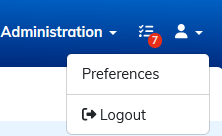
You can disconnect and finish your active session with the button in the main menu n the top right-hand side of the interface.
![[Note]](cco-note.svg) |
Forced logout |
|---|---|
|
Account managers can view a list of active sessions on Calenco and close a specific session if necessary by clicking on |
