5. Edit a form
The created forms are available for editing in:
-
Web application by operators, customer account managers and administrators;
-
Forms tab in Calenco by operators, customer account managers and administrators;
-
Documents tab in Calenco by customer account managers and administrators;
-
the context of a workflow by operators, customer account managers and administrators assigned to one or more tasks.
5.1. Edit a form in the web app
This access to the forms is available for Operators, Customer Account Managers and Administrators.
Click the gray arrow of the desired model to open the list of forms:
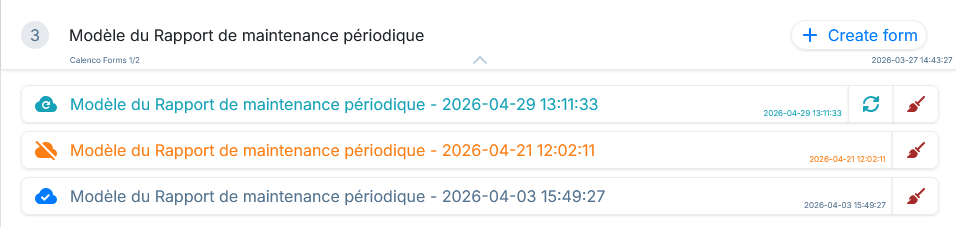
Each form has the following information:
-
its status (see below for description);
-
its label and (when hovering over the label) the user who created it as well as the name of the respective file in Calenco;
-
the date and time of its creation.
Forms in the web app can have three statuses:
-
 This form has not yet been synchronized with Calenco. Only its local version exists.
-
 Local changes have not yet been synchronized with Calenco.
-
 All local changes have been synchronized with Calenco.
The status message appears in the tooltip when hovering over the icon with the cursor.
Forms with local changes not synchronized with Calenco can be synchronized at any time with the  .
.
Any form can be cleaned up from local storage with the  . Any changes that have not been synchronized with Calenco will be lost.
Click in the area of each form to open it in editing.
![[Note]](cco-note.svg) |
|
|
Completed Forms. Forms that have been completed in editing no longer appear in the web application. |