5.2. Edit a form via the Forms tab
This access to the forms is available for Operators, Customer Account Managers, and Workspace Administrators.
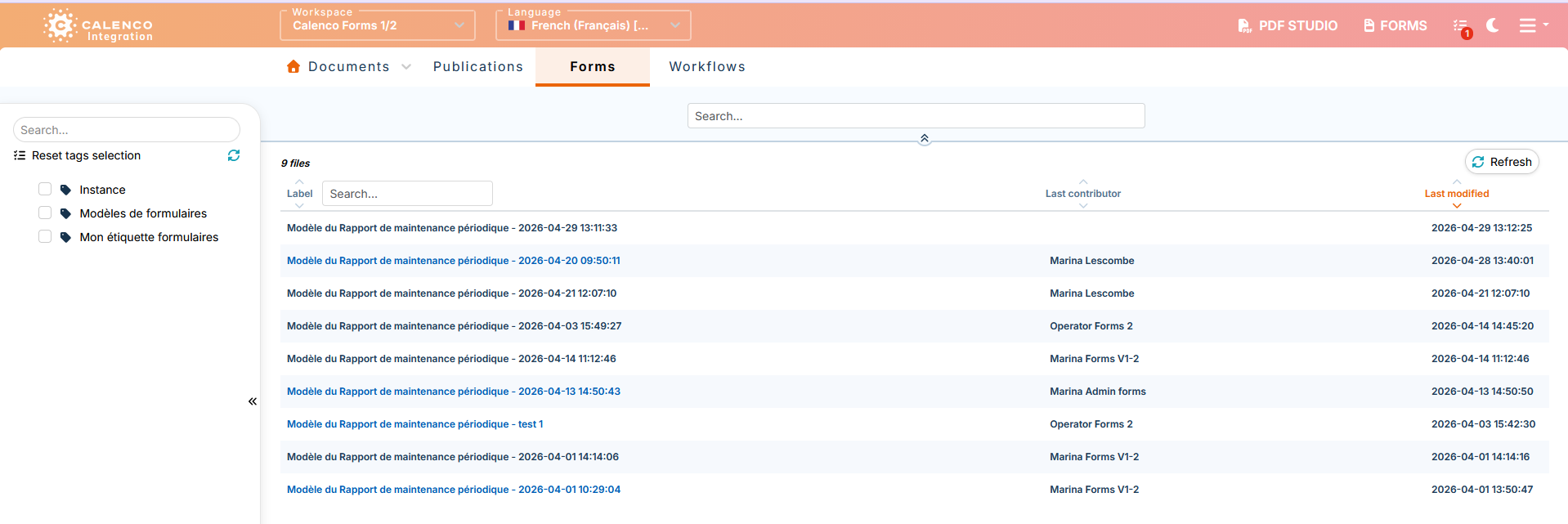
The Forms tab contains a list of forms based on the users' roles.
Forms in blue are clickable for opening in the web application.
Forms in black are not clickable because they are assigned to another user or locked in editing by another user.
![[Tip]](cco-tip.svg) |
|
|
The list of forms can be filtered using the tags. |
![[Important]](cco-important.svg) |
|
|
In order for operators to access the forms in the Forms tab, the customer account manager must assign the necessary tags to each operator (see Assign forms to operator). |
Operators can open the forms:
-
that they created through the web application and thus locked them on themselves;
-
that are assigned to them via the lock.
The workspace administrator and customer account manager access the full list of forms created on the Forms tab. They can open the forms:
-
locked on themselves;
-
which are assigned to them via the lock if applicable.
To open a form that is locked or assigned to another user, the workspace administrator or customer account manager must unlock it in the tab (see Procedure 53, “To unlock a form”).