3.20. To associate a text to its description
Some text content can be marked with a circle and a number inside and be linked to its description in the document.
The content to be described is presented by the co element. The co element must be integrated into one of the following:
-
literallayout,
-
programlisting,
-
classsynopsisinfo,
-
computeroutput,
-
funcsynopsisinfo,
-
prompt,
-
replaceable,
-
screen,
-
synopsis,
-
systemitem,
-
userinput.
The majority of these elements are used to reproduce the computer (programming) environment. The literallayout has the semantics closest to the element simpara (simple paragraphe) most often used for text blocks. This element will be used below for the configuration of cos.
The description is wrapped in the element calloutlist made up of the callout elements.
-
In Document, insert the
literallayoutvia the menu → . Write text for the item you want to describe. -
With the menu → , insert an element
coinside the elementliterallayout.Repeat steps 1 and 2 for all the elements you want to describe.
-
Give each
coelement an ID.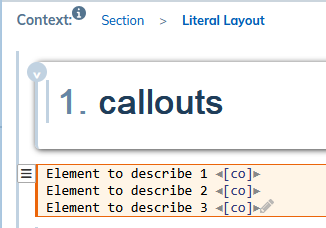
-
Add the
calloutlistelement via the menu → . -
Add as many
calloutelements that there are elements to describe with the menu → . -
Give each
calloutan ID. -
Create a link between each
calloutand its respectivecoby placing:-
the identifier of the
coin thearearefsattribute of thecallout: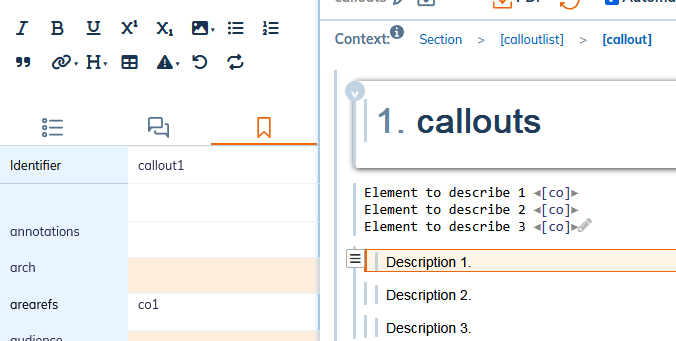
-
the identifier of the
calloutin thelinkendsattribute of theco.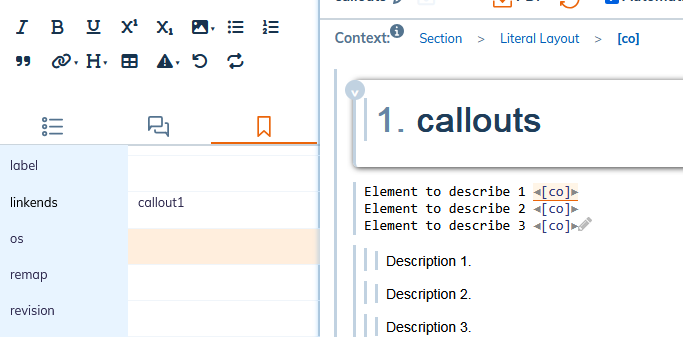
-
-
Publish the document.
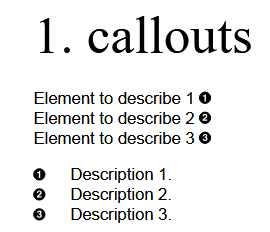
By default, the dots are black circles with white numbers. Any change to the default rendering represents further expansion of the style sheet.